← Bryan Lee04 / 05

Nook

04 / 05 · Private · Since Sep 2026

Our family, in one calm place.

Recipes, the grocery list, pets, chores, and a weekly digest of school emails, for my wife and me.

Private. Just for our family.
Made for
My wife and me
My role
Idea, design, and code
Built with
Next.js, Supabase, Apple Maps, OpenRouter
Status
Private, just for our family
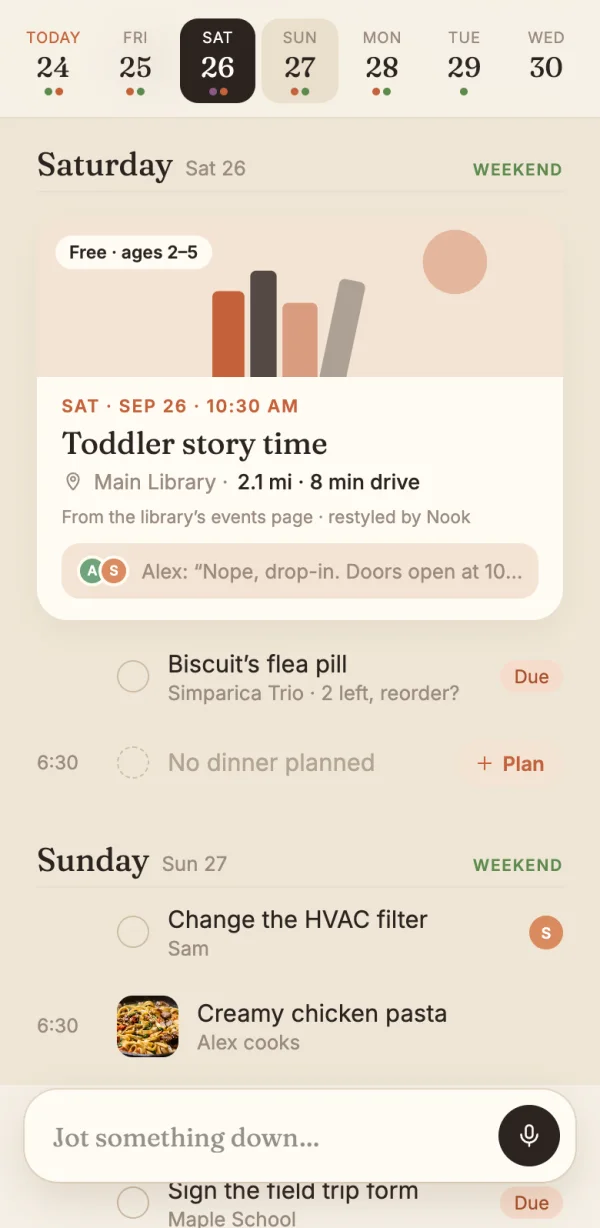
The week strip and the days ahead
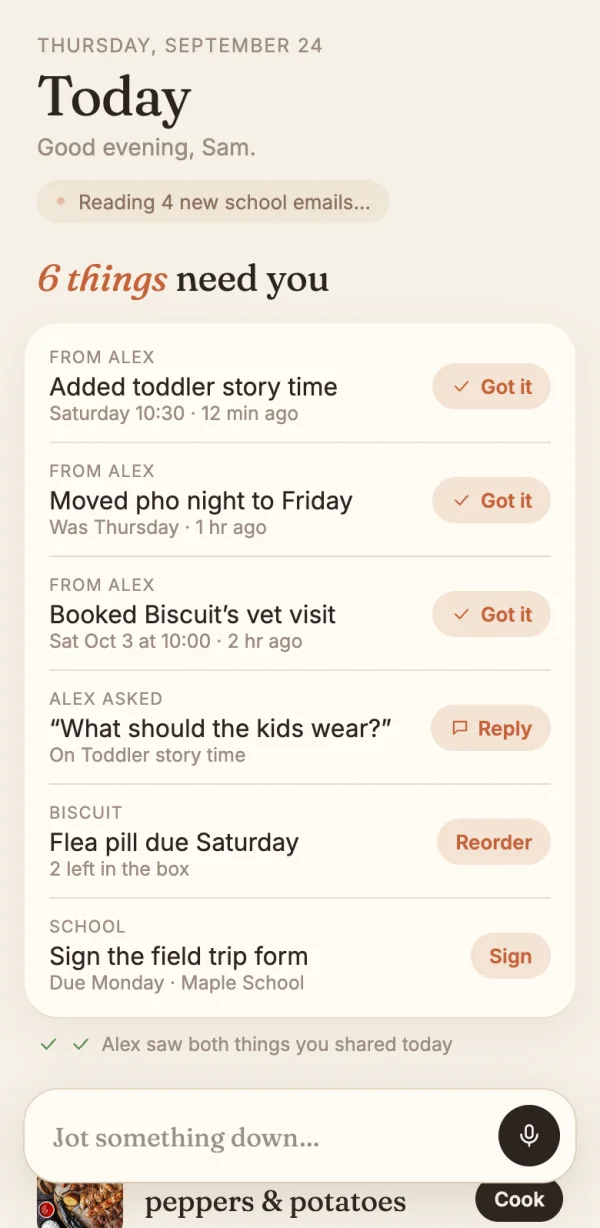
Today: six things need you
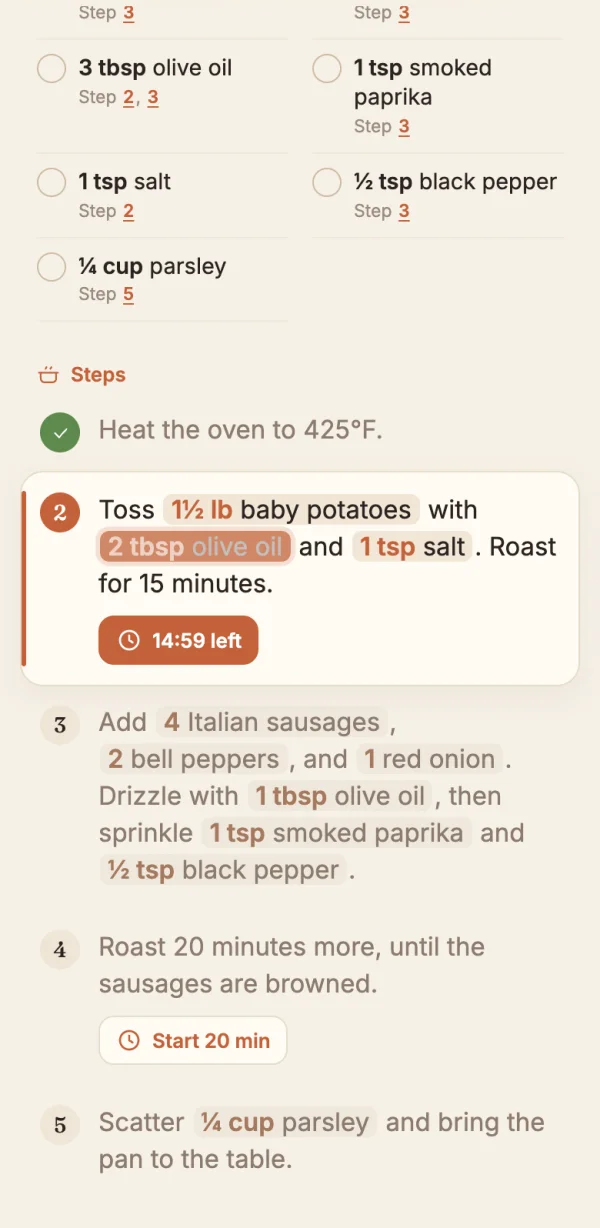
Cook mode, with amounts inside each step
The week ahead, what needs you today, and cook mode.Nook is private, so these are the final design screens, with made-up names. Food and dog photos from Unsplash.
The storySep 2026

Family life runs on small messages. One parent finds a story time and sends the link. The other is busy, and nobody knows if it got seen.

The dog’s pill is due, and no one remembers who gave the last one. One week brought sixteen school emails, and the one that mattered said to sign a form by Monday. At six o’clock, dinner is still a guess.

I didn’t want another dashboard full of tiles. I wanted one place on our phones for both of us. So every screen in Nook has one box at the bottom. Type whatever’s on your mind, and Nook files it where it belongs.

I picked the look in three rounds of five designs. Then I built the app in under a week: 109 commits, 56 of them on the first day.

The idea
One box files whatever you type. Anything one parent adds becomes a one-tap needs you for the other.
What makes it good05 ideas
01

One box for everything

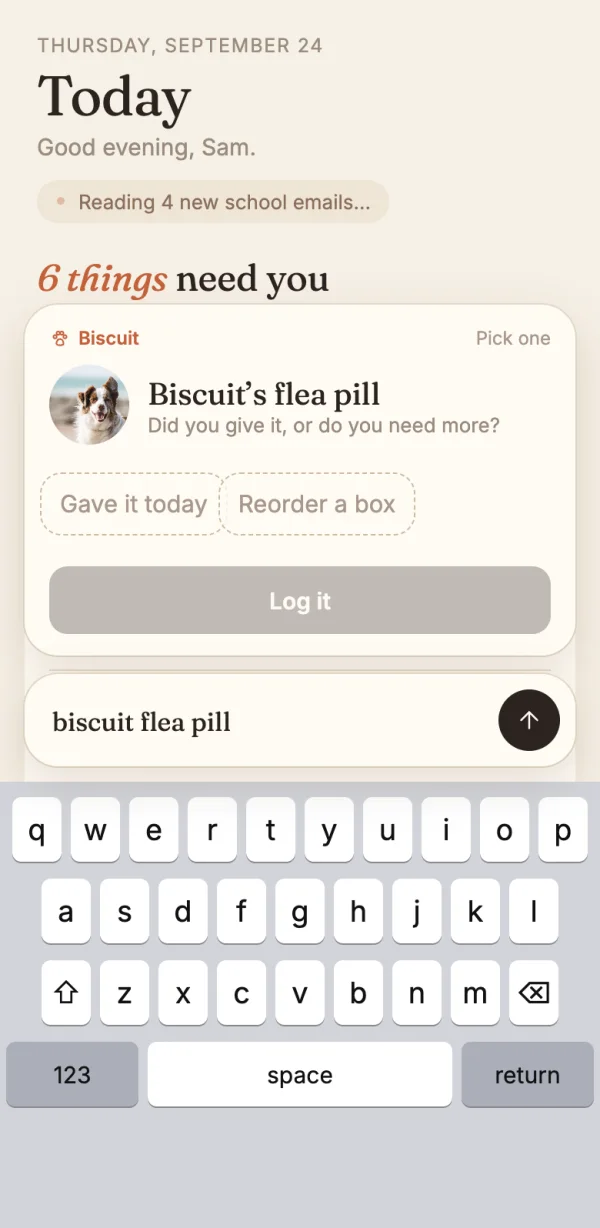
Type a dinner, an event, a chore, a grocery item, a pet dose, or a pasted link. Nook shows a card of what it understood, with one clear button like "Add to Saturday." Tap it, and the card glides into its row.

Plain rules read every keystroke for free. Nook only calls the AI when the rules aren’t sure, and even then, the card asks you to pick between two choices instead of guessing.
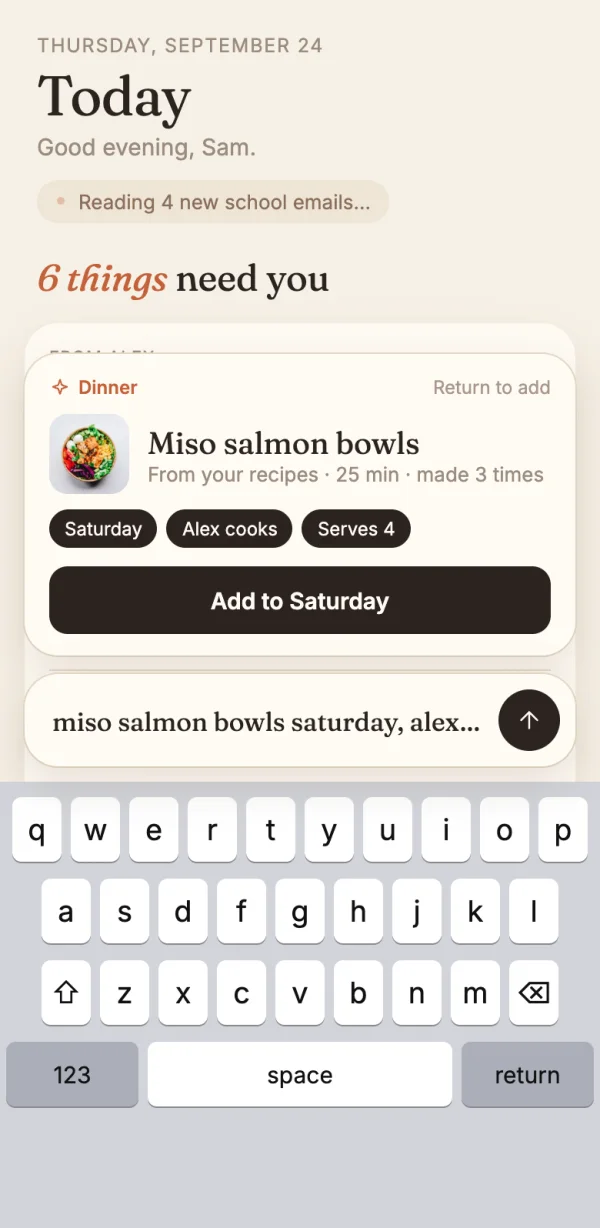
The type box turns a sentence into a dinner card
When unsure, the card asks with two choices
02

Needs you, with a seen receipt

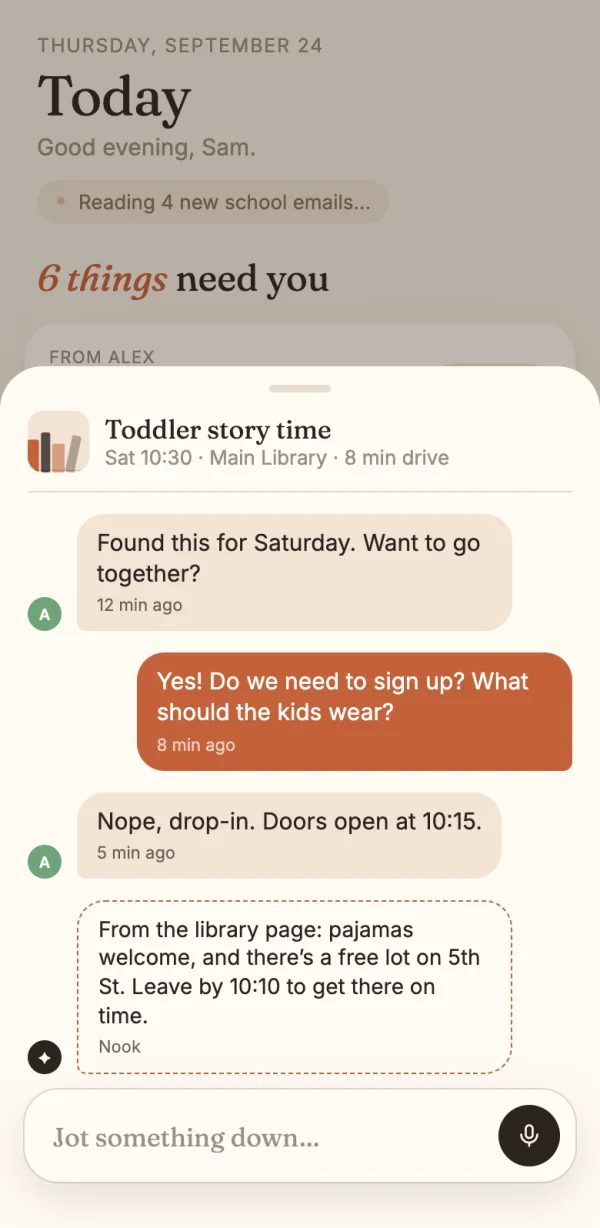
Whatever one parent adds lands at the top of the other’s Today, like "6 things need you." Each item has one button: Got it, Reply, Reorder, or Sign. The sender sees "Alex saw both things you shared today."

This is for the "did you see my message?" problem. A database trigger builds the list, so no screen can forget to tell the other parent. Pet pills, late chores, and the school digest land there too, so everything waiting on you is in one list.

Six things need you, each with one button
A short thread about one event
03

Any link becomes an event

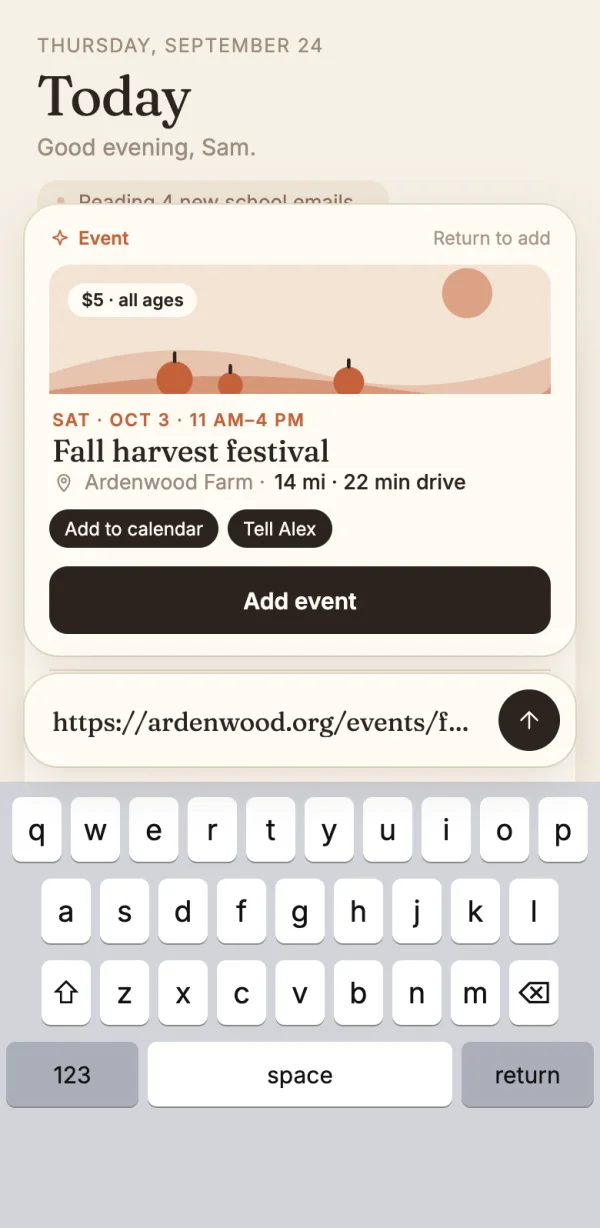
Paste a link to a story time or a festival. Nook reads the page and rebuilds it as one clean card, with cover art, the price, the ages, the date, the place, and the drive time.

Events from different websites still look like they belong together, because eight flat cover drawings replace each site’s own art. Drive times start from home, but the home address never goes to the AI.

A pasted link turns into a festival card
A story time card in the week, restyled by Nook
04

A school digest that cites its sources

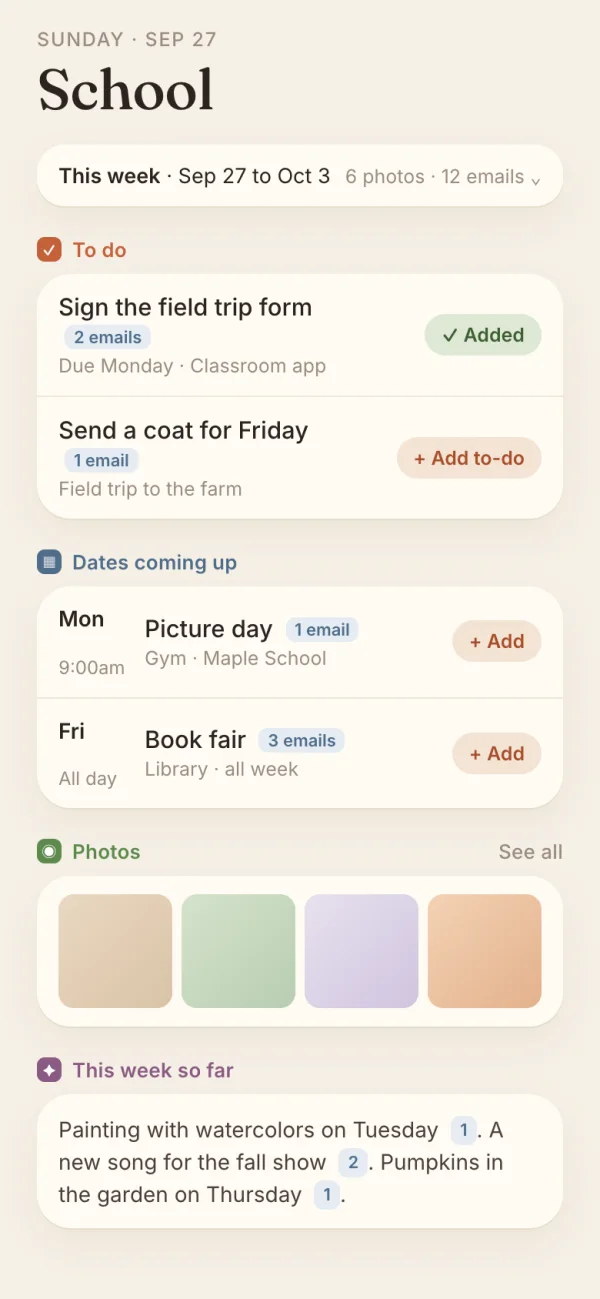
School emails go to a private address. Each Sunday, a short digest shows the week at a glance, the to-dos, the dates, and what the kids did. One tap puts a date on the family calendar.

Every line has to name the email it came from. Code throws out any line with no real source, any date that isn’t real, and any link that isn’t in the email. A digest costs about half a cent to make.

The weekly school digest, with a made-up school
05

Cook mode that does the math

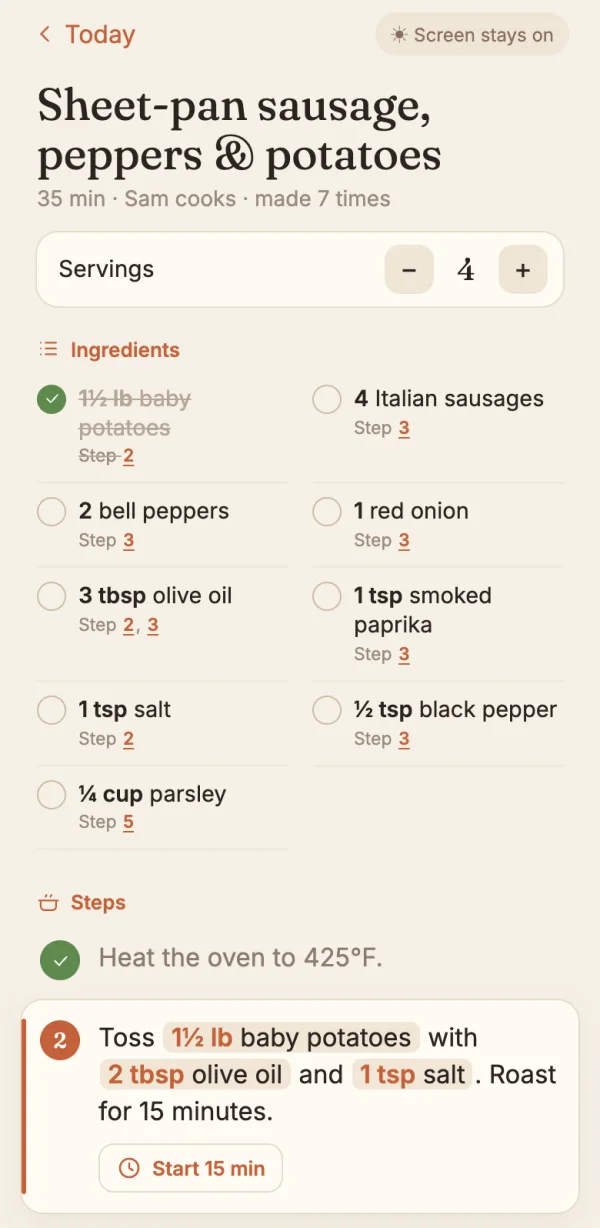
Recipes come in from a link, a cookbook photo, or pasted text. In cook mode, each step shows the exact amounts it uses, like "Toss 1½ lb baby potatoes with 2 tbsp olive oil." Timers sit inside the steps, and the screen stays awake.

Steps point at the ingredients instead of copying them, so the app calculates every amount instead of retyping it. Change the servings, and every step rescales. Code checks every amount, so a bad AI answer can’t put a wrong one on screen.

Cook mode with the ingredient list
A running timer inside a step
How I picked the look3 rounds · 15 designs

Three rounds, five designs each. Each round locked one decision before the next one started.

Round 1 · The overall lookPicked: the Paper Kitchen colors and type, with the Calm List structure
  1. Option: Paper KitchenPaper KitchenPicked
  2. Option: Soft CompanionSoft Companion
  3. Option: Calm ListCalm ListPicked
  4. Option: Fridge DoorFridge Door
  5. Option: Ember EveningEmber Evening
Round 2 · The Today screenPicked: the "needs you" list first, with a pinned week strip
  1. Option: One calm scrollOne calm scroll
  2. Option: Three tabsThree tabs
  3. Option: Needs you firstNeeds you firstPicked
  4. Option: By time of dayBy time of day
  5. Option: Week stripWeek stripPicked
Round 3 · The type boxPicked: write in a card above the keyboard, then land it in place
  1. Option: Rising cardRising cardPicked
  2. Option: Focus sheetFocus sheet
  3. Option: Lands in placeLands in placePicked
  4. Option: Talk it throughTalk it through
  5. Option: Smart wordsSmart words
The look06 colors
  • Paper#f6f0e6
  • Card#fffbf4
  • Ink#2b2320
  • Terracotta#c4623a
  • Sage#5e8a4e
  • Plum#8a5a83

Fraunces for headings, Inter for everything else, and digits from Newsreader.

Warm paper instead of app chrome, and about 30 custom line icons. There are no points and no streaks. Nobody needs a streak for the grocery list.

Try itA working demo · made-up data

Tick things off, or add something to the list.

The school digest turns a week of emails into three lines.

NookTick things off
The small stuff06 details
  • Sheets ride above the keyboard

    Sheets and the type box rise over the phone keyboard, and a tapped field scrolls to the middle of what’s left.

  • Dates in plain words

    "friday to sunday," "Oct 27-28," and "this weekend" all become events. A half-typed "add a d" doesn’t get read as tomorrow.

  • A $10 AI budget, in code

    Every paid AI call checks the month’s spend first and stops at $10. Each one has a free fallback.

  • The address stays home

    The home address is used only for drive times and weather. None of the 11 AI calls ever sees it.

  • Digits from a second font

    Fraunces draws its 8 with the big loop on top, so it looked upside down. Numbers now come from a tiny second font.

  • Nook never buys anything

    Anything that spends money stops at an approval card. Nook copies the list and opens the store’s app, and you check out there.

Under the hoodNext.js, Supabase, Apple Maps, OpenRouter
  • A phone-first web app you install to the home screen: Next.js 16, React 19, and TypeScript on Vercel, with Supabase for Postgres, sign-in, live updates, and private file storage.
  • Ten runtime dependencies, no UI kit, and no CSS framework. The styles are 937 lines of custom CSS.
  • Rules first, AI last. Plain code reads dates, kinds of notes, and recipe data. One AI function, with a monthly cap and a log of every call, handles the rest, and code checks every answer before anyone sees it.
  • All 25 tables use row-level security, and every row belongs to a household. The browser can’t call the "tell the other parent" function, so nobody can fake a seen receipt.
  • School mail comes in through a signed webhook. Nook rejects fakes, drops repeats, and moves photos to a private bucket before the sender’s links expire.
  • Each phase had a written plan and its own review round. The last two rounds found and fixed 38 issues.
Started
Sep 2026
Commits
109
Tests
864
Lines of code
28,156
Commits on day one
56
AI budget per month
$10